
Alessandro Baggio is Enterprise Delivery Director at BairesDev, where he oversees complex enterprise projects and delivery operations. He previously held multiple leadership roles at ExxonMobil for over 13 years.
Expertise



Key Points
- Process automation creates the most value when organizations treat it as an operating capability rather than a collection of isolated automation efforts.
- Different automation technologies solve different problems. Business process automation, workflow automation, RPA, intelligent process automation, and intelligent document processing should be applied according to the characteristics of the process.
- Repetition alone doesn’t justify automation. The strongest candidates have clear rules, measurable outcomes, meaningful frequency, and opportunities to reduce human error or operational friction.
- Change management, ownership, governance, and process design matter as much as the technology. AI is expanding the scope of automation, but human oversight remains important for processes involving judgment, accountability, or risk.
Automation promises productivity gains, and many teams discover this quickly. Someone writes a script to handle repetitive tasks. Another team tries a workflow tool that connects different systems. Elsewhere, a group adopts an automation technique from another part of the organization. Each of these moves can deliver incremental productivity gains. But this piecemeal approach risks creating a larger problem.
Building automation in response to immediate needs can lead to disconnected processes that fragment workflows. Without clear ownership, these automated processes can also lack the ongoing maintenance and evaluation needed to stay effective as requirements and projects evolve.
Automation requires a different approach. Rather than treating it as a collection of tools, organizations should manage it as an ongoing process that stays aligned with organizational goals and keeps delivering value as needs change over time.
The objective isn’t total automation. It’s discerning what warrants automation, and when.
The Process Automation Landscape
Several technologies fall under the broader category of process automation, and each solves different problems. Applying the right tool to the right problem is key to building a cohesive automation strategy.
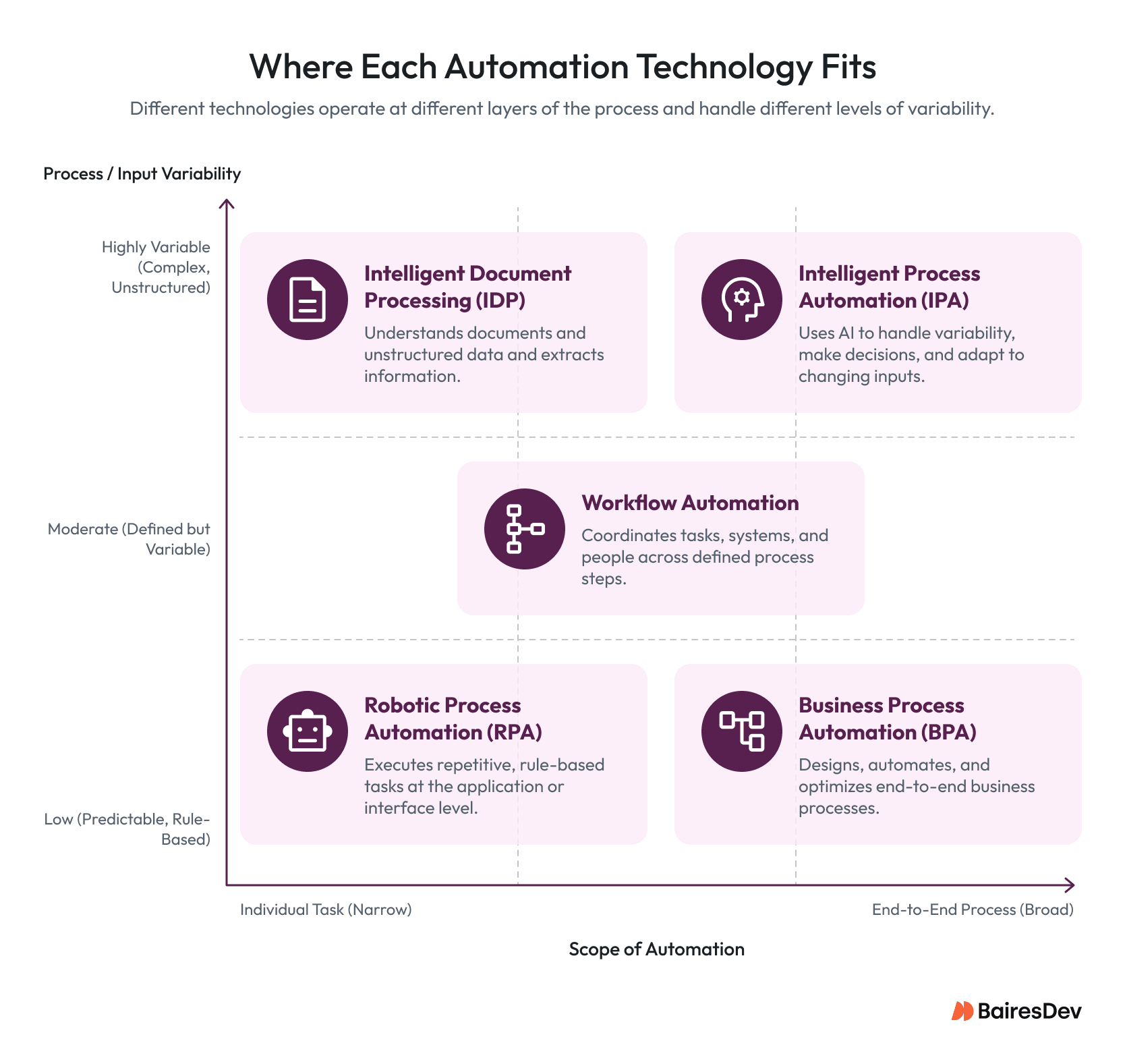
Business Process Automation (BPA)
This discipline encompasses an entire business process, not an isolated task. BPA coordinates activities across a workflow from beginning to end. Onboarding an employee, for example, may require collecting information for HR, providing accounts and equipment through IT, and obtaining manager approvals at each step. BPA can link these activities into a single process so work moves between teams in a structured, consistent way with less manual coordination.
Workflow Automation
This approach coordinates activities across systems and people, triggering discrete steps in a defined process. Incident response is a common use case: a critical alert can trigger notifications, assign owners, initiate escalation paths, and generate documentation without manual coordination. BPA reshapes the entire process from end to end; workflow automation orchestrates the steps inside that process. BPA changes what the process is. Workflow automation changes how the process runs.
Robotic Process Automation (RPA)
This technique focuses on repetitive, rule-based actions at the interface level. It mimics human actions within a system, such as clicking a button in an application. This is particularly useful when working with legacy technology that has no application programming interface (API) option. Instead of assigning an employee to manually update records in an interface, RPA can execute those actions automatically.
Intelligent Process Automation (IPA)
This capability extends automation with AI. Traditional rule-based automation works best with predictable inputs and processes and can struggle when those conditions vary. IPA uses AI to recognize patterns and interpret variable inputs, allowing automated processes to handle situations that don’t fit a strictly predefined set of rules.
Intelligent Document Processing (IDP)
This solution applies AI to documents and unstructured data. Compliance reporting is a practical use case: extracting the information needed for these reports can take significant time, especially when data is spread across different documents and file types. IDP focuses on extracting, classifying, and structuring information from documents and other unstructured content.
These approaches aren’t in competition. They can work together. The key is understanding which technology to apply and when. Over-adoption can cause as much inefficiency as under-adoption.
Process Automation Tools Comparison Matrix
| Approach | Best Use | Handles Variability? | Example |
| Business Process Automation (BPA) | End-to-end process redesign and coordination | Moderate | Release approval workflows |
| Workflow Automation | Multi-step coordination across systems and people | Moderate | Incident escalation |
| Robotic Process Automation (RPA) | Rules-based tasks at the application interface | Low | Legacy system updates |
| Intelligent Process Automation (IPA) | AI-assisted processes with variable inputs | High | Ticket categorization |
| Intelligent Document Processing (IDP) | Document understanding and data extraction | High | Compliance evidence extraction |
The distinction matters because selecting an automation tool before understanding the process can lock an organization into an implementation that solves only part of the problem. A workflow automation solution may coordinate existing process steps effectively, for example, while BPA may be more appropriate when the underlying process itself needs to be redesigned.
Once the right technology is identified, the next question is whether the process itself is ready for automation.
What Makes a Process Worth Automating
One of the most common mistakes is assuming any repetitive task can be automated. Repetition alone doesn’t justify the investment. A good candidate for automation occurs frequently enough to create meaningful operational effort, follows clear rules, and produces measurable outcomes. Automation is particularly valuable where it can reduce human error.
Processes tied to audit requirements have increasingly been automated. The work is often repetitive, yet it has real value. Audit reports also need to be traceable and repeatable, something process automation technologies can support well. Manual auditing can increase errors, while IDP tools can reduce the workload tied to data extraction and manual data entry.
Frequency, like repetition, can also falsely encourage automation. A task may happen thousands of times a month and still be a poor fit if the underlying process keeps changing.
Automation also amplifies existing process quality, so processes should be carefully evaluated before they’re automated. A poorly designed process won’t be improved by automation. Upstream and downsSStream dependencies matter too: automating individual tasks in isolation can introduce unintended complexity that erodes the value automation was meant to create.
Decisions about automation should be viewed through the lens of operational impact, not activity volume alone. The better question isn’t “Can we automate this?” It’s “Should we automate this now?”
A Practical Automation Candidate Scorecard
| Evaluation Factor | Strong Candidate | Warning Sign |
| Frequency | Happens often enough to create meaningful operational effort | Occurs rarely |
| Rules | Process steps follow stable, explicit rules | Decisions change significantly by context |
| Outcome | Cycle time, errors, cost, or other outcomes can be measured | No meaningful baseline exists |
| Process stability | Current process is reasonably consistent | Process changes constantly |
| Error exposure | Manual work creates avoidable errors | Errors are infrequent or have limited operational impact |
| Dependencies | Upstream and downstream system interactions are understood | Hidden dependencies or workarounds exist |
| Risk | Automation can be introduced with controlled operational risk | Failure could create significant business or compliance risk |
| Ownership | A business or technical owner can maintain the automated process | No clear owner exists |
This scorecard helps separate genuine automation opportunities from tasks that merely happen to be repetitive. The strongest opportunities usually combine operational friction with a stable process and a measurable outcome.
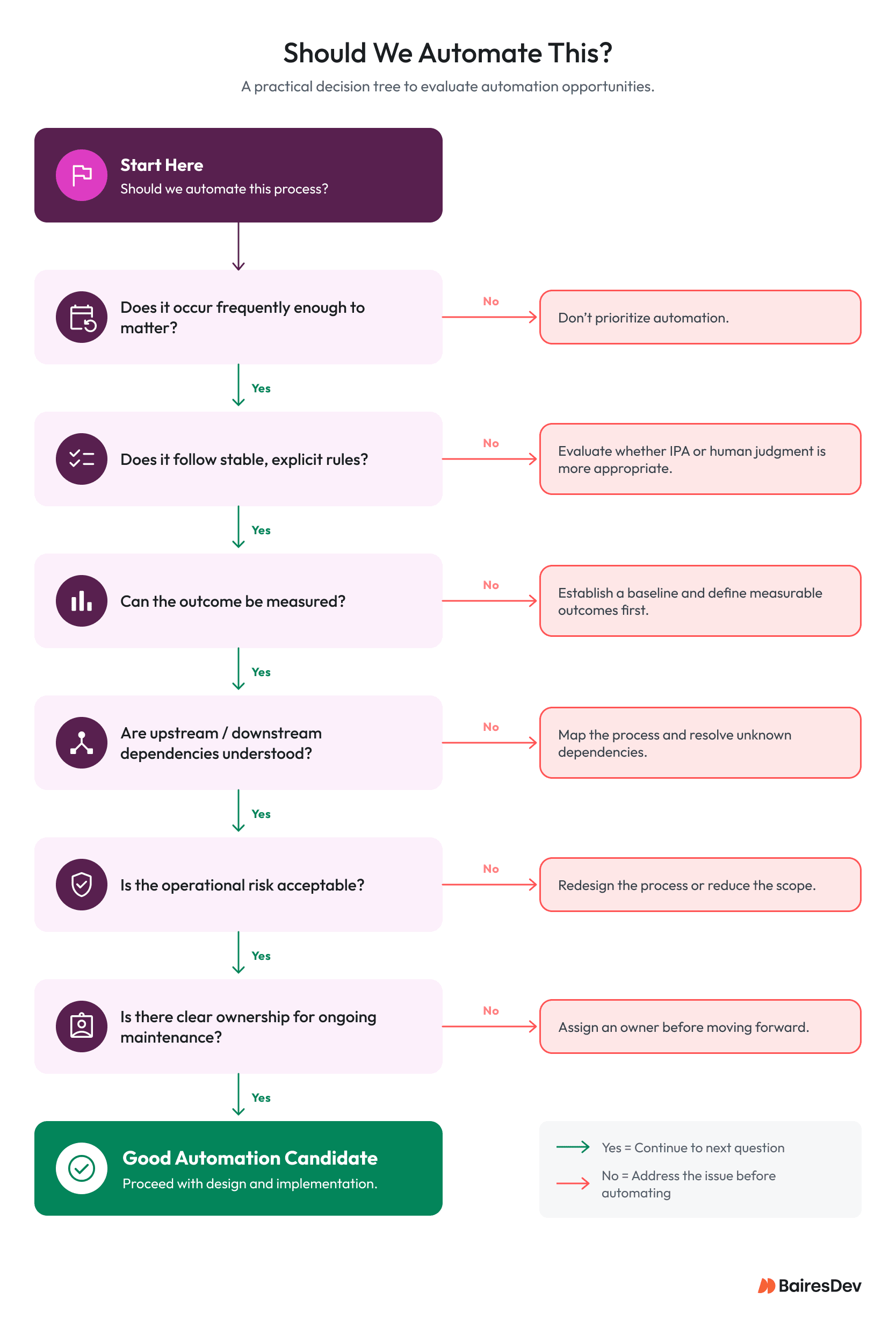
Even when a process is a strong automation candidate, organizational readiness determines whether automation succeeds. This is why change management often determines whether automation efforts deliver value.The organizational foundation sets the conditions for whether automation succeeds or stalls.
Why Change Management Has More Impact Than Technology
The broader challenge facing automation is organizational adoption. Many automation efforts fail because of organizational problems rather than technical limitations. Staff resistance and poor process mapping repeatedly show up as common failure points. Technology is often just the visible symptom.
Organizations sometimes assume a process is already documented and well understood, when individual teams may see only a portion of the workflow.
Few people understand an entire process in context, which can hide dependencies, encourage workarounds, and create unexpected requirements.
What looked straightforward becomes complicated. Automation adoption is easier when it’s compatible with an organization’s governance.
The organization also needs to support changes to established processes and ways of working. Existing information infrastructure and applications need to be amenable to automation tooling and system integration, and new automated processes need to align with users’ experience and expectations.
Automation should improve workflows and redirect human effort toward higher-value work. Teams can feel threatened when automation is framed around labor reduction. Although reducing manual effort may be part of the goal, it’s generally more productive to frame automation around removing repetitive work and freeing up capacity.
Buy-in requires more than training sessions. People need to understand why a process exists. They need clarity about ownership and confidence that automation will improve their work rather than diminish their influence. Without employee buy-in, teams may bypass automated systems and drift back to manual processes.
The implementation model matters as much as the tooling itself. The scale of current AI adoption reinforces why organizational readiness matters. McKinsey’s 2025 global survey found that 88% of respondents said their organizations regularly use AI in at least one business function, up from 78% the year before. Yet approximately one-third said their organizations had begun scaling AI programs across the enterprise. The gap between adoption and scaled operational use remains substantial.
Where Process Automation Delivers Value to Engineering Teams
Engineering teams already rely heavily on automation through practices such as CI/CD, automated testing, and infrastructure management. The real opportunity often sits where work continues to scale with operational complexity rather than engineering value.
Release coordination is a good example. Deployment activities may already be automated, but the surrounding work can still depend on manual decisions and coordination. Teams often still need to approve changes, investigate failed deployments, or provide status updates. Even with a fully automated pipeline, moving software safely to production depends on human judgment and communication, which gets harder as system complexity increases.
A similar pattern shows up around maintaining systems over time. Incident response requires engineers to gather information from multiple sources, identify responsible teams, communicate updates, and document actions taken. Compliance activities create comparable overhead. This work is necessary, but much of it is repetitive and focused on sustaining existing processes rather than improving products.
Process automation addresses these challenges by moving coordination into the workflow itself. Workflow automation and BPA can encode approvals, routing logic, and escalation paths directly into the process.
Instead of tracking down ownership during an incident or figuring out the next step, the system generates notifications and enforces actions based on predefined rules and process structure. IDP can also help by reducing the manual work needed to extract evidence from multiple sources.
Variation in processes traditionally required manual work, but IPA can add value here too. In incident response, for instance, a system can classify and triage incoming incidents. This doesn’t remove engineers’ responsibility or judgment, but it does reduce the number of decisions and coordination steps needed before work can begin.
The value of these approaches extends across the full lifecycle of engineering work. As systems scale, coordination costs grow even in environments with extensive automation already in place. Process automation can reduce the burden of managing process steps and coordination, freeing engineering teams to focus on systems and services.
Measuring the Success of Process Automation
It’s important to measure outcomes, not implementation. Successfully deploying a new workflow doesn’t necessarily mean it created value. Before introducing automation, teams should establish a baseline for current performance. Without a baseline, it’s hard to know whether a process actually improved.
Metrics should connect to operational outcomes. Reduced cycle time can indicate that work is moving through the process more efficiently. Lower error rates can suggest repetitive tasks are being completed more consistently.
Compliance processes can be monitored for stronger audit pass rates and improved traceability. Value can also show up as increased engineering capacity, since reducing coordination and repetitive tasks gives engineers more time for development.
Hours saved are often treated as the primary measurement for automation initiatives, but that can be misleading. A process may require less manual effort while still creating a bottleneck elsewhere. Improvements should be evaluated across the entire process. Automation should produce measurable gains in efficiency while improving the consistency of the work.
Process Automation Metrics That Matter
| Outcome | Example Metric | What It Can Reveal |
| Speed | Cycle time, processing time, time to resolution | Whether work moves through the process faster |
| Reliability | Error rate, rework rate, failed transactions | Whether automated processes improve consistency |
| Capacity | Hours of manual work removed, engineering capacity released | Whether teams can redirect effort to higher-value work |
| Compliance | Audit pass rate, evidence completeness, traceability | Whether automated processes strengthen controls |
| Adoption | Automation usage, bypass rate, exception rate | Whether teams actually use the new process |
| Business performance | Throughput, cost per transaction, customer onboarding time | Whether operational improvements translate into business outcomes |
The distinction between implementation and outcome becomes especially important as automation expands. A process automation system that executes every step exactly as designed can still fail to improve overall business performance if the process contains unnecessary approvals, poorly designed handoffs, or downstream bottlenecks.
The right measurement approach follows the process from beginning to end rather than measuring only the automated step.
AI Is Expanding the Scope of Process Automation
Traditional automation works best when inputs and processes are predictable, since that lets rules be explicitly defined and reliably executed. Artificial intelligence reduces this constraint by helping systems interpret unstructured data and natural language.
In practice, many real-world workflows don’t have clean inputs. Support requests, for example, often contain ambiguous or incomplete context. This used to require manual interpretation before any automation could take place.
With IPA tooling, this phase can be supported through automated classification, information extraction, and routing. Human oversight and decision-making aren’t removed from the picture. Instead, the system supports the workflow by structuring inputs and preparing the work for downstream actions, so preparation and coordination can be handled programmatically while people stay responsible for decisions that require judgment or accountability.
Current enterprise adoption suggests this shift has moved beyond experimentation. Microsoft’s 2025 Work Trend Index found that 46% of leaders said their organizations were using AI agents to fully automate workstreams or business processes. The report also found that 45% of leaders said expanding team capacity with digital labor was a top priority for the following 12 to 18 months.
Deloitte’s 2025 research describes AI agents as extending RPA into more complex and dynamic processes through their ability to understand context, learn dynamically, and make decisions autonomously. It also emphasizes human oversight to maintain control and accountability.
As AI broadens what can be automated, platform choices increasingly shape how these capabilities scale.
Choosing automation platforms is therefore also a strategic decision. Process automation doesn’t exist in isolation; over time, it gets integrated into existing systems, workflows, and processes, which makes compatibility with the larger technology environment an important consideration.
Governance becomes more important as automation expands, too. Organizations need visibility into how processes are changed, who owns them, and how access is controlled. Scalability goes beyond technical performance: a platform may work well for one team but not fit across the entire organization. Vendor stability matters as well, since automation becomes embedded into business operations and changing vendors later can be disruptive.
Building Automation Capability Instead of Automation Projects
Long-term success doesn’t begin with an ambitious initiative. It starts with predictable workflows that carry low operational risk and produce measurable outcomes. Give the automation process clear ownership, track metrics to gauge its effectiveness, and learn from early results.
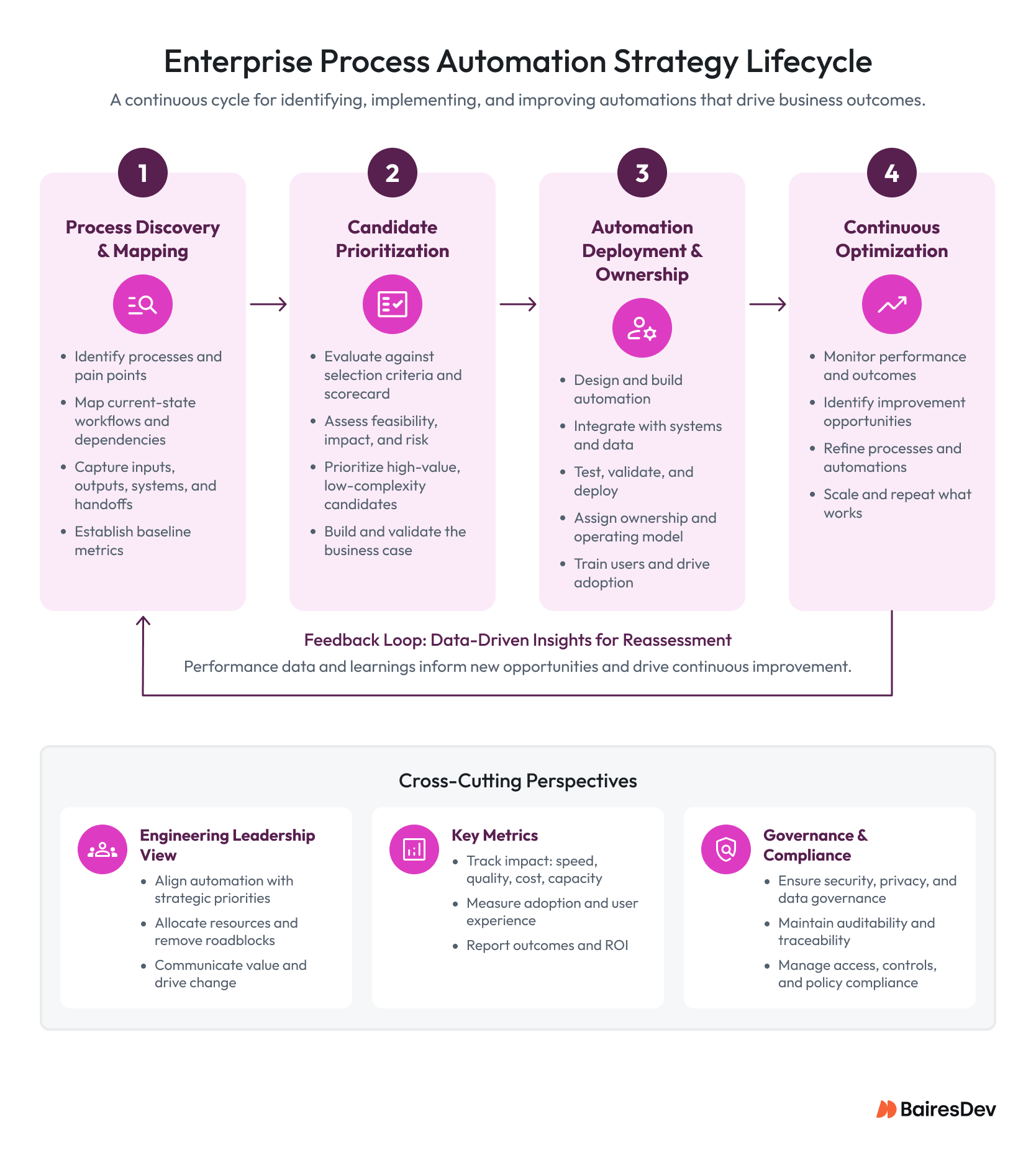
Over time, capability grows through improved iterations. Early automation efforts create process visibility and ownership patterns that support larger initiatives down the line.
Build the Capability, Not the Project
Process automation can improve business efficiency, reduce manual effort, and give teams more capacity. But the technology itself isn’t the strategy.
The stronger approach starts with understanding the current process, identifying where operational friction occurs, and deciding whether automation will actually improve the outcome. From there, organizations can select the right combination of workflow automation, BPA, RPA, IPA, IDP, or other automation technologies.
The aim isn’t an ever-larger inventory of automations. It’s an operation that becomes more consistent and efficient as it scales. That requires treating automation as a continuous improvement discipline. Processes change. Systems change. Business requirements change. Automation needs clear ownership, measurable outcomes, governance, and the ability to evolve alongside them.
The organizations that scale automation successfully aren’t necessarily the ones that automate the most. They’re the ones that consistently make better decisions about what to automate, how to implement it, and when human interaction still creates more value.
Frequently Asked Questions
What is process automation?
Process automation is the use of technology to execute or coordinate business and operational activities with minimal manual intervention. Rather than focusing only on individual tasks, process automation connects activities across workflows so work moves through a system in a structured, repeatable way.
What processes are good candidates for automation?
Strong candidates are repetitive and follow clear rules. They happen frequently and produce measurable outcomes. Processes prone to human error can also create significant value when automated. Audit reporting, data entry, customer onboarding, and workflow coordination often fit these characteristics because they require consistency and repeatability.
What should organizations automate first?
Organizations should generally start with processes that occur frequently, follow relatively stable rules, create measurable operational friction, and carry manageable risk. Early candidates should also have clear ownership and well-understood upstream and downstream dependencies. Starting with a contained process makes it easier to establish a baseline, measure results, and apply what the organization learns to larger automation initiatives.
Which processes are difficult to automate?
Processes that rely heavily on judgment, creativity, or strategic decision-making are difficult to automate effectively. These activities often change depending on context and may not have the stable rules or patterns an automated system needs to follow.
What is the difference between RPA and workflow automation?
RPA focuses on repetitive actions inside applications and systems. It mimics user behavior, such as navigating screens or entering information. Workflow automation focuses on coordinating a process across systems and people. One executes tasks; the other manages how work moves through a process.
What is the difference between BPA and workflow automation?
BPA addresses an entire business process and can be used to coordinate or redesign that process from beginning to end. Workflow automation focuses more narrowly on coordinating defined steps, handoffs, triggers, and actions across systems and people. The two are often used together.
How does AI change process automation?
Traditional automation performs best when inputs are predictable. AI expands automation by helping systems interpret unstructured information and adapt to variation. Intelligent Process Automation can support activities such as document analysis, ticket classification, data extraction, and information routing without requiring perfectly structured inputs.
How should organizations measure automation success?
Success should be measured using operational outcomes rather than implementation activity. Metrics such as cycle time reduction, lower error rates, improved audit outcomes, reduced manual effort, adoption rates, and increased employee capacity give a better indication of value than simply tracking hours saved.
Alessandro Baggio is Enterprise Delivery Director at BairesDev, where he oversees complex enterprise projects and delivery operations. He previously held multiple leadership roles at ExxonMobil for over 13 years.
Expertise